

T-Shirt Transfer Placement & Design Size
The Official LogoGear.Store Complete Cheat Sheet
Visual Reference Chart
Exact placement zones and dimensions for every standard print location.
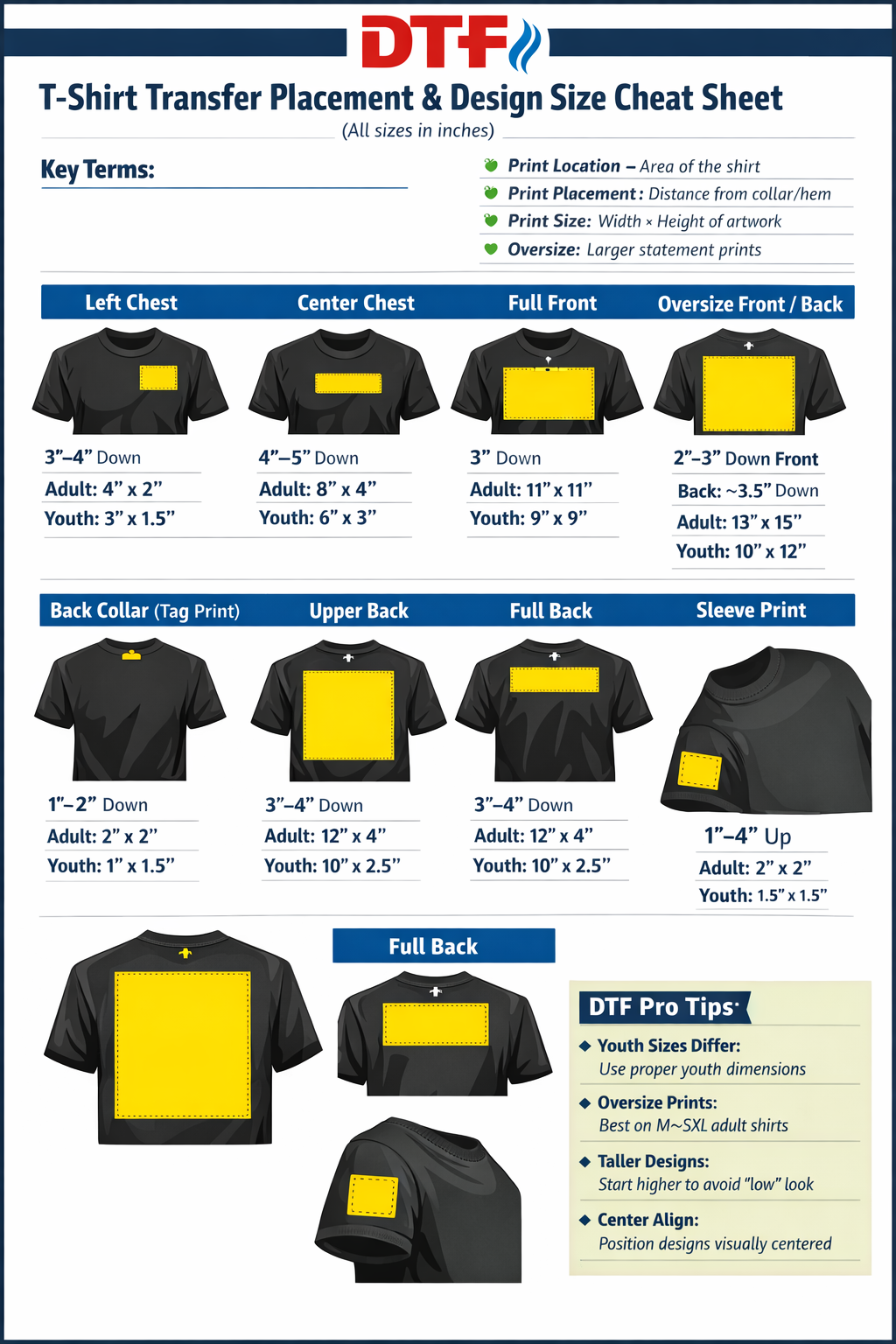
Essential Terminology
Print Location: Area of the shirt where design is applied.
Print Placement: Distance from collar or hem to edge of design.
Oversize Print: A statement print covering most of front or back.
Gang Sheet: Multiple designs on one film to maximize material use.
Standard Reference Guide
| Location | Drop from Collar | Adult Size | Youth Size |
|---|---|---|---|
| Left Chest | 3"–4" Down | 4" W × 2" H | 3" W × 1.5" H |
| Center Chest | 4"–5" Down | 8" W × 4" H | 6" W × 3" H |
| Full Front | 3" Down | 11" W × 11" H | 9" W × 9" H |
| Oversize Front | 2"–3" Down | 13" W × 15" H | N/A (Adult M-3XL) |
| Full Back | 3"–4" Down | 12" W × 4" H | 10" W × 2.5" H |
Max Print Area by Shirt Size
Youth M
7" × 7"
Adult S
10" × 10"
Adult M-L
11" × 11"
Adult XL+
12" × 12"
10 Essential Pro Tips
- ✅ Youth Sizes Differ: Never scale down an adult print; use youth dimensions.
- ✅ Taller Designs: Start higher (2"–3" from collar) to avoid a "dropped" look.
- ✅ Paper Test: Print at 100% scale and lay on garment before pressing.
- ✅ Flag Rule: American flag stars always face toward the front of the garment.
- ✅ Teflon Sheet: Always cover transfer before pressing to prevent damage.
- ✅ Center Align: Fold shirt in half to find the true centerline first.
- ✅ Sleeve Balance: If using a left chest print, place sleeve print on the right.
- ✅ Mixed Orders: 10"–10.5" wide works as a "sweet spot" for mixed youth/adult orders.
- ✅ Oversize Prints: Best results on Adult M–3XL. Avoid on petite cuts.
- ✅ Gang Sheets: Batch multiple designs on one film to maximize yield.